What is Emberel?
Emberel is a reminder-first AI memory. Capture in the web app, by voice, or with a photo; each entry becomes an editable Spark with a useful title and behavior. Email capture has passed a controlled production test, MCP is access-gated, and SMS is disabled.
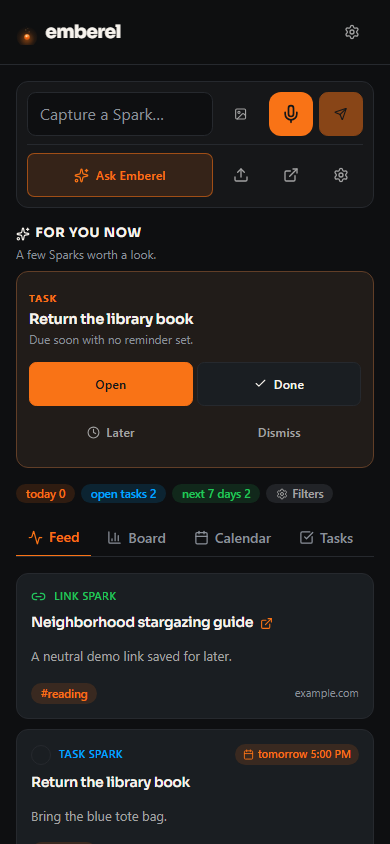
Most notes apps are a shoebox: everything goes in, nothing comes back out. Emberel is built around resurfacing: dated Sparks return through Today and reminder views, while Home can offer one to three eligible Sparks in For you now with Open, Later, Dismiss, and Done only where completion is meaningful.
Everything you capture is a Spark
Whatever you send becomes a Spark. You never have to pick what it is — Emberel decides whether it behaves as a reminder, task, note, checklist, or link, gives it a title, and you can change it anytime.
Reminder Sparks
Time-bound nudges. Emberel keeps them visible and can deliver email when configured. SMS/phone delivery is disabled.
Task Sparks
Things to do, with or without a due date. They live on your board until they're done.
Note Sparks
Longer thoughts, ideas, and quick captures with a rich editor. Eligible older Notes can appear in For you now, and up to five recent undated Notes can appear in the weekly digest shelf.
Checklist Sparks
Step-by-step lists — packing, groceries, launch day. Emberel spots the list in your capture and keeps every box checkable.
Link Sparks
Saved URLs, kept with context so they're findable instead of lost in a tab.
How it works, in one line
Capture → it becomes a Spark → it lands on one page → it resurfaces when it matters.
One page, four lenses
Everything you capture lives in a single pool that you view through four lenses, so nothing gets stranded in a folder you forget to open:
- Feed — a stream of everything, newest first, filterable by behavior or tag.
- Board — drag-and-drop columns by status or tag, for anything you're actively working.
- Calendar — a time view of reminders and dated Sparks.
- Tasks — a focused to-do view with sorting and quick views.
More than a notebook
Capture is only the start. Emberel also:
- Reminds you where you'll see it — through dated app views and email when configured, plus a weekly digest. SMS remains disabled.
- Answers questions in the app — Ask uses relevant Emberel context for memory-specific questions and may use model reasoning for general planning or writing.
- Connects approved assistants — MCP is deployed but access-gated; public-beta signup alone does not grant access.
- Connects Google — Calendar and Tasks mappings are implemented with the current proof boundary explained under Integrations.
- Keeps controls visible — use the supported export, review assistant memory, and run self-serve deletion with the implementation boundaries documented under privacy.
New here? Getting started takes you from sign-in to your first reminder in about a minute.